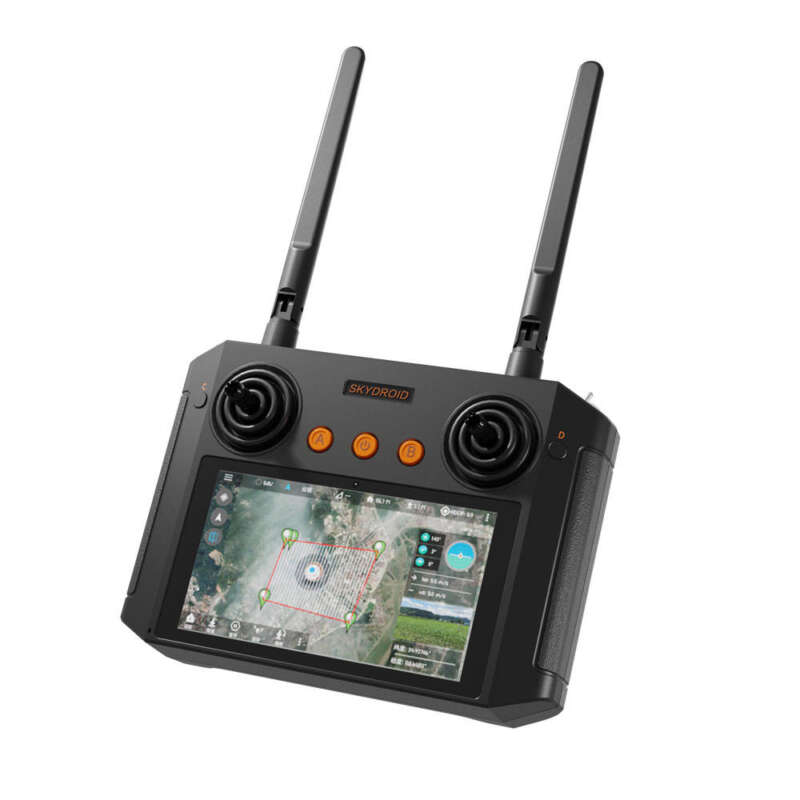
Skydroid H12 PRO Remote Control
- Frequency: 2.4GHz stable connection
- Range: 10km control distance
- FPV Feed: Live video via Wi-Fi app
- Flight Control: One-key takeoff/landing
- Stability: Optical flow positioning
The Skydroid H12 Pro remote controller is a standard 2.4GHz transmitter that comes with your drone. It’s designed to be ergonomic, beginner-friendly, and full of smart features that help you control flight and camera functions with precision.
In this guide, you’ll learn about its key features, layout, pairing steps, and FPV live-feed connection.
- 2.4GHz Frequency
The Skydroid H12 Pro provides a stable and responsive connection. It offers a reliable control range of around 300–500 meters in open areas without interference. - Ergonomic Design
Its shape fits comfortably in your hands, with intuitively placed joysticks and buttons, so you can fly easily for long periods. - One-Key Takeoff and Landing
A single button allows you to automatically launch or land your drone safely.
This feature makes takeoff and landing simple, especially for beginners. - Emergency Stop Button
The emergency stop instantly halts all motors, causing the drone to stop mid-flight.
Use this feature only in emergencies, as it will make the drone drop. - Speed Mode Switch
Switch between Low, Medium, and High speed modes.
This helps beginners start slow and gradually build their flying confidence. - Camera Control Buttons
You can capture photos, record videos, or adjust the camera angle directly using dedicated buttons. - Trimming Buttons
Fine-tune your drone’s stability if it drifts in any direction — left, right, forward, or backward. - Optical Flow Positioning
This feature works with the drone’s downward sensors to hold a steady hover indoors, where GPS might not work.
As a result, your flights remain smooth and controlled.


How to Pair the Skydroid H12 Pro with the Drone
Most drones come pre-paired with the remote.
However, if you need to reconnect them, follow these steps carefully:
- Turn on the Remote.
- Place the Drone on a Flat Surface and turn it on.
- Start Pairing:
- Method A: Move the left joystick up, then down. The drone’s lights will turn solid once connected.
- Method B: Some models pair automatically or have a Link/Pairing button.
Once paired, the light indicators on both devices will stay steady.
If pairing fails, repeat the process while keeping the devices close.
How to Connect Your Phone for FPV Live Feed
Follow these simple steps to view live video from your drone camera:
- Install the App:
Download the “Skydroid FPV” app (or the app listed in your manual). - Turn On Both Devices:
Power on your drone and the remote controller. - Enable Wi-Fi on Your Phone:
- Open Wi-Fi settings and connect to the network (e.g., Skydroid-H12PRO_XXXX).
- Default password: 12345678 or 00000000.
- Open the App:
Launch the FPV app to see the real-time video feed directly on your phone screen.
If the live feed does not appear, reconnect your phone to the drone’s Wi-Fi and restart the app.
Common Troubleshooting Tips
- Remote Won’t Turn On:
Check batteries and recharge or replace them. - Drone Not Connecting:
Turn both devices on, then re-pair them while keeping them close. - Drone Drifts While Hovering:
Place it on a flat surface before powering on, and use trimming buttons to stabilize flight. - No FPV Feed:
Reconnect Wi-Fi or restart the Skydroid FPV app.
In addition, always check the manual for model-specific troubleshooting advice.
Important Safety and Setup Tips
- Read the Manual:
The included user manual contains essential details for safe setup and operation. - Calibrate Before Flying:
Always calibrate the compass and IMU through the app before your first flight or if the drone becomes unstable. - Use Emergency Stop Carefully:
Only use it when absolutely necessary, such as avoiding a crash.
Once triggered, the drone will fall instantly.
The Skydroid H12 Pro remote controller is a reliable, comfortable, and feature-rich device that makes drone flying smoother and safer.
Its user-friendly controls, live FPV feed support, and safety features make it a perfect choice for beginners and professionals alike.
Therefore, if you’re looking for precision and ease of use, this controller is an excellent companion for your drone.